 QUAICU
I built a small app so you can play browser games with an Xbox or PS5 controller. It turns the controller into keyboard keys, and it works with other PlayStation pads and any third-party USB controller you plug in now or later. Click a button on the picture and choose the key or key combination it should press. It is free to use, released under the MIT license, and the source is open.
It is compatible with games that read keyboard keys. One of them:
- Sansad Showdown, by Shivam (@shivmbuilds). A remarkable game. I highly recommend it.
The mapping window is the whole app: one profile, saved next to the app, and nothing else to install on Windows.
Download
GitHub repository: ramavathdeepak05/PS-Xbox-Controller-adapter
Windows. Double-click GamepadAdapter.exe and the mapping window opens. Nothing else needs to be installed.
Mac (Apple Silicon). Unzip GamepadAdapter-mac.zip and open GamepadAdapter.app. macOS ships the app as a zip because an .app is a folder, and this build is not signed. The first time, right-click GamepadAdapter.app, choose Open, then choose Open again.
macOS will not type keys until Gamepad Adapter is allowed under System Settings → Privacy & Security → Accessibility. Turn the switch on, quit the app, and open it again.
Intel Macs can run the Python source from the repository instead of this app. The same Accessibility permission is required.
Map a button
- Click the key chip next to a control.
- Press a key, or hold Ctrl, Alt, or Shift and then press a key. For example, hold Ctrl and press C to bind Ctrl+C. On a Mac, hold Command and then a letter to bind a shortcut such as Cmd+C. Control is still the Control key.
- Click Apply Changes.
Press only Ctrl, Alt, or Shift, then release it, to bind that modifier by itself. Click the × on a chip to clear it. Until you click Apply Changes, the window shows Not saved yet.
Pause keeps the window open but stops sending keys. Resume turns sending back on. Reset to Default restores the original keys. Clear All empties every binding.
Only one profile is stored, as controller_mapping.json. On Windows it sits next to GamepadAdapter.exe. On a Mac it is saved next to the app, or next to ps3_adapter.py when you run the source. Closing the window closes the app.
Which controller you see
The mapping window puts the connected controller in the middle, with a key chip on every control.
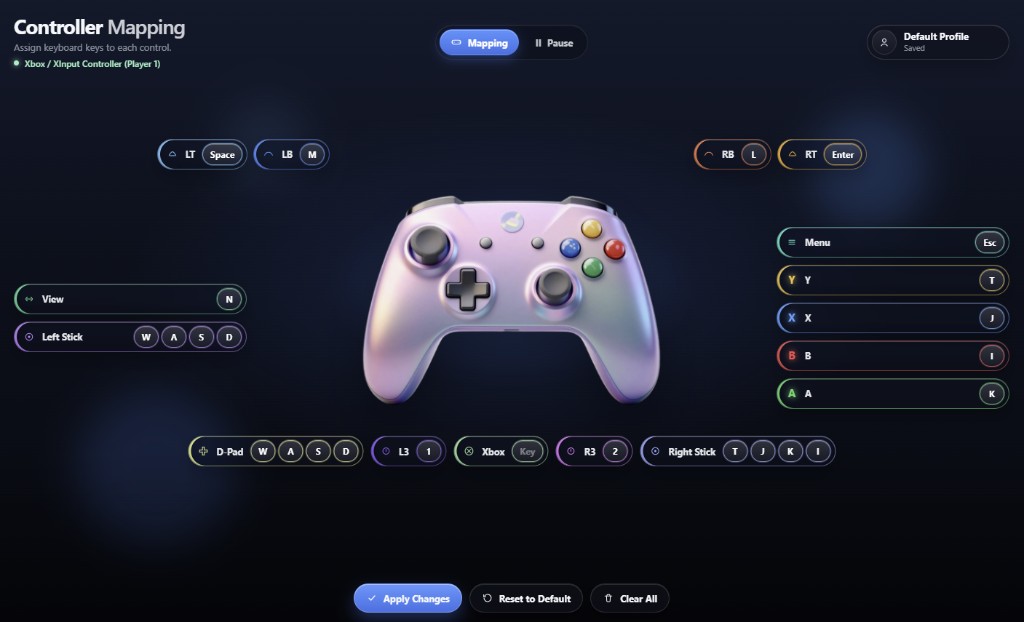
A PlayStation controller shows the PlayStation image, with Share, Options, the touchpad, and the PlayStation button. An Xbox controller shows the Xbox image. The labels switch to View, Menu, LB, RB, LT, RT, and A, B, X, Y. The D-pad and left stick trade places, matching an Xbox pad.
A third-party controller is supported the same way. The picture follows the name Windows or macOS reports. An Xbox name, or an XInput controller, uses the Xbox picture. A name that mentions PlayStation, DualSense, DualShock, or Sony uses the PlayStation picture. Every other USB gamepad uses the PlayStation layout, and you map its buttons from there.
What it is doing
About once a millisecond, the app checks which controls are held. For each one, it looks up the saved binding and holds those keys down. A binding of CTRL+C holds Ctrl, then C. A binding of CMD+C holds Command, then C, which is copy on a Mac. Keys that no held control still needs are released, with the main key released before the modifier.
On Windows, Xbox controllers are read through XInput. PlayStation controllers and other third-party USB gamepads are read through the Windows joystick interface. Keystrokes are sent with SendInput. On a Mac, PlayStation, Xbox, and other USB gamepads are read through SDL, and keystrokes are sent with Quartz, which is why the Accessibility permission is required.
Source
The application and its source are free under the MIT License. The repository is ramavathdeepak05/PS-Xbox-Controller-adapter. It includes ps3_adapter.py, the Mac and Windows backends, the mapping window, and the controller images.
On Windows, from the source:
pip install pywebview pyinstaller
run_adapter.bat
build_app.bat builds a new dist\GamepadAdapter.exe.
On a Mac:
python3 -m pip install --user pywebview pygame
python3 ps3_adapter.py
run_adapter.command does those two steps. The Mac app on the download link above is the Apple Silicon build produced by GitHub Actions.
QUAICU builds and looks after software for businesses. If you have an app that needs to hold up in production, start with a free production check, or see how we work.